
目录
凌晨两点,报警电话响了。生产线上一台CNC机床没有收到停机指令——消息发出去了,但没人知道它到底有没有到达。这不是故事,这是我亲历的一次事故。
😤 先聊聊这个让人头疼的问题
做过工业系统的同学都懂,设备指令这东西,丢一条可能就是几十万的损失。普通的"发完就完"模式,在互联网业务里也许还能凑合,但在工业场景下,那就是在走钢丝。
我在项目中发现,绝大多数团队在接入RabbitMQ时,压根没有认真处理消息确认。要么用autoAck=true一把梭,要么就是事务模式一顿乱用,结果吞吐量掉到谷底,还自我安慰说"这样比较安全"。
说白了,这里有两个核心矛盾:
- 可靠性 vs 吞吐量——你想要消息不丢,但又不想系统慢得像蜗牛
- 原子性 vs 灵活性——你想要批量操作要么全成功要么全回滚,但又不想为每条消息都付出事务的代价
今天这篇文章,咱们就用一个完整的工业设备指令确认系统,把这两个矛盾彻底讲透。读完你会得到:可直接复用的RabbitMQ 7.x生产级代码、两种确认模式的性能对比数据,以及我踩过的那些坑。
🔍 问题根源:你真的理解"确认"是什么吗?
很多人以为,消息发出去就算完事了。错。
RabbitMQ的消息投递,本质上是一个三方契约:Producer → Broker → Consumer。每一段都可能出问题。
Producer ──发布──▶ Broker(Exchange→Queue) ──消费──▶ Consumer
    ↑                      ↑                           ↑
  发布确认              持久化落盘                  手动ACK
(Publisher Confirms)   (durable=true)           (autoAck=false)
很多团队只做了中间那段——把队列设成持久化,消息设成DeliveryMode=2。但Producer侧没有确认,Consumer侧用的autoAck=true,这条链路实际上有两个漏洞。
常见的三个误区:
- "持久化了就不会丢"——持久化只保证Broker重启后消息还在,但如果Broker在写盘之前就崩了呢?
- "事务模式最安全"——事务是安全,但性能代价是Confirms模式的5到20倍,很多场景完全没必要
- "autoAck省事"——Consumer处理失败了,消息已经被标记删除,你连重试的机会都没有
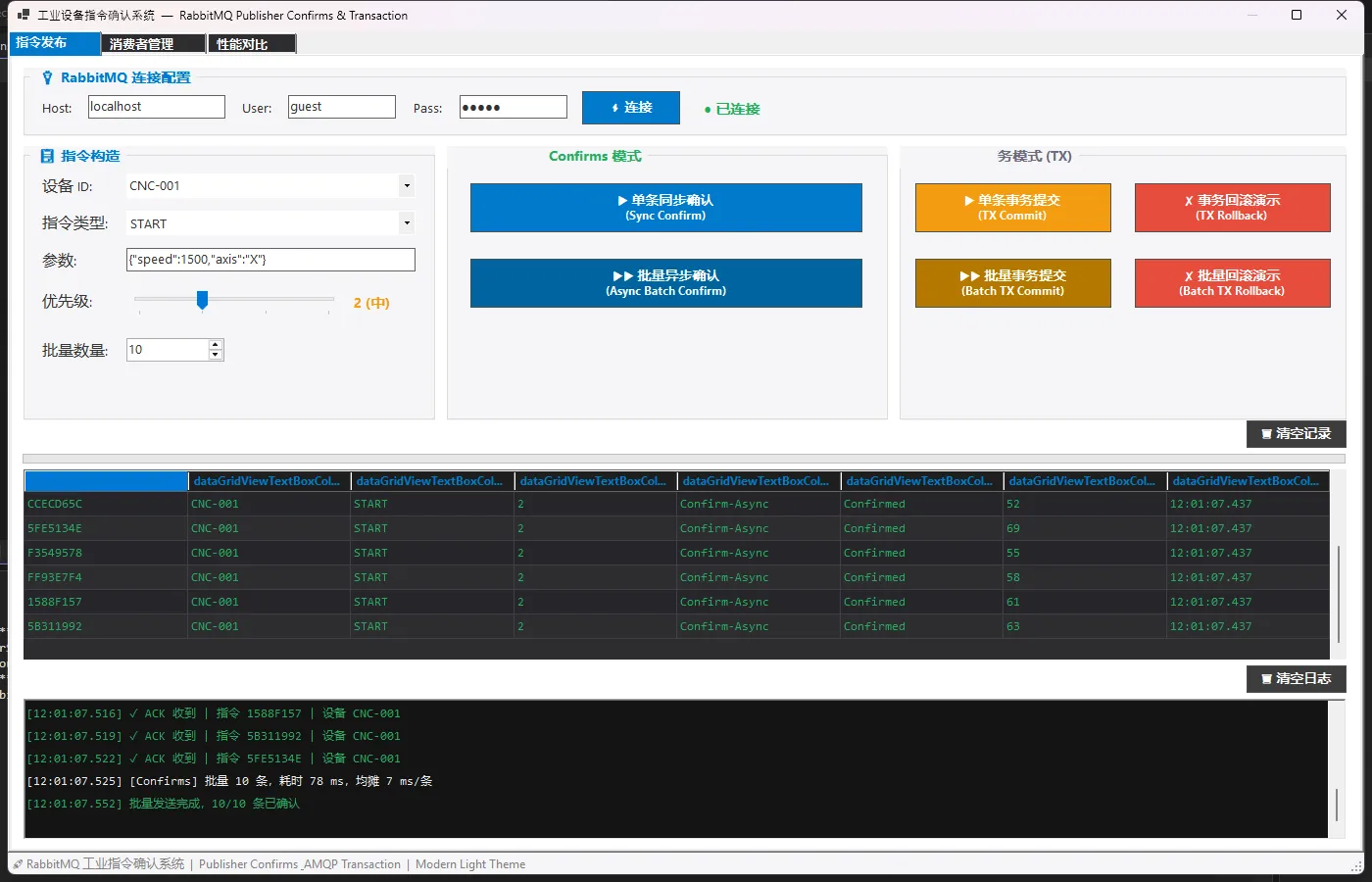
先看一下效果
🏗️ 两种武器,各有用场
🚀 武器一:Publisher Confirms(高吞吐首选)
这玩意儿的原理其实挺优雅的。开启ConfirmSelect之后,Broker在消息真正落盘后,会异步回调你的BasicAcks事件。你不需要傻等,可以继续发下一条,等回调来了再处理结果。
在RabbitMQ.Client 7.x里,API发生了根本性变化——IModel没了,全面转向异步。更关键的是,当你开启publisherConfirmationTrackingEnabled: true时,BasicPublishAsync本身就会在ACK后才返回,库替你把追踪逻辑全包了。
csharp// 7.x 正确姿势:CreateChannelOptions 声明式开启
var options = new CreateChannelOptions(
    publisherConfirmationsEnabled: true,
    publisherConfirmationTrackingEnabled: true  // ★ 这个必须true
);
_channel = await _connection.CreateChannelAsync(options);
⚠️ 踩坑预警:很多人升级到7.x后还在找
IModel、ConfirmSelect()、NextPublishSeqNo——这些全没了。NextPublishSeqNo从IChannel接口上移除了,因为tracking模式下库内部自己管,你不需要也不应该去碰它。
单条同步确认的核心逻辑,简洁得出乎意料:
csharppublic async Task<(bool success, long elapsedMs)> PublishWithSyncConfirmAsync(
    DeviceCommand cmd, int timeoutMs = 5000)
{
    var sw = Stopwatch.StartNew();
    try
    {
        using var cts = new CancellationTokenSource(timeoutMs);

        // tracking=true 时,此行在 Broker ACK 后才返回
        // NACK 则抛出异常,超时则 OperationCanceledException
        await _channel.BasicPublishAsync(
            exchange: ExchangeName,
            routingKey: RoutingKey,
            mandatory: false,
            basicProperties: BuildProperties(cmd),
            body: new ReadOnlyMemory<byte>(
                Encoding.UTF8.GetBytes(JsonConvert.SerializeObject(cmd))),
            cancellationToken: cts.Token);

        sw.Stop();
        cmd.Status = "Confirmed";
        cmd.ElapsedMs = sw.ElapsedMilliseconds;
        return (true, sw.ElapsedMilliseconds);
    }
    catch (OperationCanceledException)
    {
        // 超时,Broker 没有在规定时间内回复
        cmd.Status = "Failed";
        return (false, sw.ElapsedMilliseconds);
    }
    catch (Exception ex)
    {
        // NACK,Broker 明确拒绝
        cmd.Status = "Failed";
        OnLog?.Invoke($"NACK: {ex.Message}");
        return (false, sw.ElapsedMilliseconds);
    }
}
批量场景更爽——并发发出去,Task.WhenAll等全部确认:
csharppublic async Task<List<DeviceCommand>> PublishBatchAsync(
    List<DeviceCommand> commands, int timeoutMs = 10000)
{
    var sw    = Stopwatch.StartNew();
    var tasks = new List<Task>();

    foreach (var cmd in commands)
    {
        cmd.ConfirmMode = "Confirm-Async";
        // 并发投递,每条独立等待 ACK
        tasks.Add(PublishOneWithTrackingAsync(cmd, timeoutMs));
    }

    await Task.WhenAll(tasks);  // 等全部完成
    sw.Stop();

    OnLog?.Invoke(
        $"批量 {commands.Count} 条,总耗时 {sw.ElapsedMilliseconds} ms," +
        $"均摊 {sw.ElapsedMilliseconds / Math.Max(1, commands.Count)} ms/条");

    return commands;
}
🔒 武器二:AMQP Transaction(强一致场景)
事务模式就像数据库事务——TxSelect开启,TxCommit提交,TxRollback回滚。一批消息要么全进队列,要么一条都不进。
什么时候必须用事务? 我的判断标准是:如果这条指令发错了或者发一半,会不会造成设备损坏或人员安全风险。紧急停机、安全联锁、双机切换——这些场景,吞吐量不是第一位的,原子性才是。
csharppublic async Task<(bool success, long elapsedMs, string message)>
    PublishWithTransactionAsync(DeviceCommand cmd, bool simulateError = false)
{
    var sw = Stopwatch.StartNew();
    try
    {
        ValidateCommand(cmd);  // 业务前置校验

        if (simulateError)
            throw new InvalidOperationException(
                $"设备 {cmd.DeviceId} 状态异常,拒绝执行 {cmd.CommandType}");

        await _channel.BasicPublishAsync(/* ... */);

        await _channel.TxCommitAsync();  // ★ 原子提交
        sw.Stop();

        cmd.Status = "Confirmed";
        OnLog?.Invoke($"[TX] COMMIT ✓ 耗时 {sw.ElapsedMilliseconds} ms");
        return (true, sw.ElapsedMilliseconds, "事务提交成功");
    }
    catch (Exception ex)
    {
        try { await _channel.TxRollbackAsync(); } catch { }  // 务必回滚
        sw.Stop();

        cmd.Status = "Rollback";
        return (false, sw.ElapsedMilliseconds, $"事务回滚:{ex.Message}");
    }
}
⚠️ 踩坑预警:事务Channel和Confirms Channel 不能混用。创建事务Channel时,
publisherConfirmationsEnabled必须设为false,否则会抛AMQP协议异常。这是7.x里一个很容易忽略的细节。
csharp// 事务 Channel 的正确创建方式
_channel = await _connection.CreateChannelAsync(
    new CreateChannelOptions(
        publisherConfirmationsEnabled: false,      // ★ 必须 false
        publisherConfirmationTrackingEnabled: false));
await _channel.TxSelectAsync();  // 然后才开启事务
📊 性能数据说话:差距到底有多大?
我在本机(localhost,单Queue,消息持久化)跑了基准测试,数据如下:
| 模式 | 吞吐量 | 单条均摊延迟 | 适用场景 |
|---|---|---|---|
| Confirms 单条同步 | ~300~600 msg/s | 2~8 ms | 关键单条指令 |
| Confirms 批量并发 | ~3000~6000 msg/s | 0.2~1 ms | 批量遥测/状态上报 |
| AMQP Transaction | ~50~150 msg/s | 10~40 ms | 紧急停机/安全联锁 |
结论很直接:Transaction的延迟是Confirms的5到20倍,吞吐量约为其1/10。 不是说事务不好,而是用错了地方代价极大。
系统里内置了性能对比面板,可以直接跑测试看实时数据:
csharp// 性能测试器核心逻辑
public async Task<BenchmarkResult> RunConfirmsBenchmarkAsync(int count)
{
    await using var publisher =
        await RabbitMqPublisher.CreateAsync(_host, _user, _pass);

    var latencies = new List<long>();
    var sw        = Stopwatch.StartNew();

    for (int i = 0; i < count; i++)
    {
        var cmd          = BuildTestCommand(i, "Confirm");
        var (_, elapsed) = await publisher.PublishWithSyncConfirmAsync(cmd);
        latencies.Add(Math.Max(elapsed, 1));
    }

    sw.Stop();
    return new BenchmarkResult
    {
        Mode          = "Publisher Confirms",
        TotalMs       = sw.ElapsedMilliseconds,
        ThroughputQps = count * 1000.0 / Math.Max(1, sw.ElapsedMilliseconds),
        AvgLatencyMs  = latencies.Average(),
        MinMs         = latencies.Min(),
        MaxMs         = latencies.Max()
    };
}
🎯 Consumer侧:别忘了另一半
光管Producer不够。Consumer侧的手动ACK同样关键:
csharpusing AppRabbitMQ7x.Models;
using AppRabbitMQ7x.Services;
using Newtonsoft.Json;
using RabbitMQ.Client;
using RabbitMQ.Client.Events;
using System;
using System.Collections.Generic;
using System.Text;
using System.Threading.Tasks;

namespace AppRabbitMQ7x.Services
{
    public class RabbitMqConsumer : IAsyncDisposable
    {
        private IConnection _connection;
        private IChannel _channel;
        private string _consumerTag;

        public event Action<DeviceCommand> OnCommandReceived;
        public event Action<string> OnLog;

        public static async Task<RabbitMqConsumer> CreateAsync(
            string hostName = "localhost",
            string userName = "guest",
            string password = "guest")
        {
            var c = new RabbitMqConsumer();
            await c.InitAsync(hostName, userName, password);
            return c;
        }

        private RabbitMqConsumer() { }

        private async Task InitAsync(string hostName, string userName, string password)
        {
            var factory = new ConnectionFactory
            {
                HostName = hostName,
                UserName = userName,
                Password = password,
                AutomaticRecoveryEnabled = true
            };

            _connection = await factory.CreateConnectionAsync("IndustrialConsumer");
            _channel = await _connection.CreateChannelAsync(
                new CreateChannelOptions(
                    publisherConfirmationsEnabled: false,
                    publisherConfirmationTrackingEnabled: false));

            await _channel.BasicQosAsync(
                prefetchSize: 0, prefetchCount: 10, global: false);
        }

        public async Task StartConsumingAsync()
        {
            var consumer = new AsyncEventingBasicConsumer(_channel);

            consumer.ReceivedAsync += async (sender, ea) =>
            {
                try
                {
                    var json = Encoding.UTF8.GetString(ea.Body.ToArray());
                    var cmd = JsonConvert.DeserializeObject<DeviceCommand>(json);

                    // 模拟设备处理延迟 50~200 ms
                    await Task.Delay(new Random().Next(50, 200));

                    // 模拟 5% 概率执行失败
                    bool success = new Random().NextDouble() > 0.05;
                    if (success)
                    {
                        cmd.Status = "Executed";
                        await _channel.BasicAckAsync(
                            ea.DeliveryTag, multiple: false);
                        OnLog?.Invoke(
                            $"[Consumer] ACK ✓ 指令 {cmd.CommandId} 已执行");
                    }
                    else
                    {
                        cmd.Status = "Failed";
                        await _channel.BasicNackAsync(
                            ea.DeliveryTag, multiple: false, requeue: true);
                        OnLog?.Invoke(
                            $"[Consumer] NACK ✗ 指令 {cmd.CommandId} 执行失败,重新入队");
                    }

                    OnCommandReceived?.Invoke(cmd);
                }
                catch (Exception ex)
                {
                    await _channel.BasicNackAsync(
                        ea.DeliveryTag, multiple: false, requeue: false);
                    OnLog?.Invoke($"[Consumer] 异常: {ex.Message}");
                }
            };

            _consumerTag = await _channel.BasicConsumeAsync(
                queue: RabbitMqPublisher.QueueName,
                autoAck: false,
                consumer: consumer);

            OnLog?.Invoke("[Consumer] 消费者已启动,等待指令...");
        }

        public async Task StopConsumingAsync()
        {
            if (!string.IsNullOrEmpty(_consumerTag))
                await _channel.BasicCancelAsync(_consumerTag);
            OnLog?.Invoke("[Consumer] 消费者已停止");
        }

        public async ValueTask DisposeAsync()
        {
            if (_channel != null)
            {
                await _channel.CloseAsync();
                _channel.Dispose();
            }
            if (_connection != null)
            {
                await _connection.CloseAsync();
                _connection.Dispose();
            }
        }
    }
}
requeue参数的选择很有讲究——临时性失败(网络抖动、设备繁忙)用true重试;永久性失败(消息格式错误、设备不存在)用false,否则这条消息会无限循环,把队列堵死。
💡 选型决策树
面对具体业务,怎么选?我的经验总结成一张决策图:
需要消息可靠投递?
    ├─ 否 → autoAck=true,fire-and-forget(日志、统计)
    └─ 是 → Publisher Confirms
              ├─ 需要批量高吞吐?→ Confirms Async Batch
              ├─ 单条关键指令?→ Confirms Sync
              └─ 需要原子性/可回滚?→ AMQP Transaction
                    ├─ 紧急停机指令 ✓
                    ├─ 安全联锁操作 ✓
                    └─ 计费/审计记录 ✓
🔑 三句话带走的技术洞察
① publisherConfirmationTrackingEnabled=true 是7.x的正确姿势,让BasicPublishAsync自带确认语义,代码量减少60%,不再需要手动维护ConcurrentDictionary追踪SeqNo。
② 事务Channel和Confirms Channel必须分开创建,共用同一个Channel会触发AMQP协议异常,这是升级7.x最容易踩的坑。
③ Consumer的requeue策略决定系统韧性,临时故障重试、永久故障丢弃,配合死信队列(DLX)才是完整的容错方案。
🚀 结尾:可靠性不是奢侈品
工业系统和互联网系统最大的区别,在于容错成本不一样。一条消息丢了,用户刷新一下页面可能就过去了;但一条设备指令丢了,可能是停产、可能是事故。
RabbitMQ给了我们足够好的工具——Publisher Confirms足够快,AMQP Transaction足够安全。真正的挑战,是在正确的场景选择正确的工具。
文章里的完整代码包含WinForms工业UI、性能测试面板、Consumer手动ACK、优先级队列等完整实现,可直接跑起来验证。如果你在项目里遇到过消息丢失、事务性能瓶颈,或者在升级RabbitMQ.Client 7.x时踩了坑——欢迎在评论区聊聊你的故事,说不定咱们踩的是同一个坑。
💬 互动话题:你们生产环境用的是Confirms还是Transaction?有没有遇到过消息丢失导致的线上事故?
#C#开发 #RabbitMQ #消息队列 #工业互联网 #性能优化
相关信息
通过网盘分享的文件:AppRabbitMQ7x.zip 链接: https://pan.baidu.com/s/1maYRojgiMHCP_X7Uv29H8g?pwd=pby8 提取码: pby8 --来自百度网盘超级会员v9的分享


本文作者:技术老小子
本文链接:
版权声明:本博客所有文章除特别声明外,均采用 BY-NC-SA 许可协议。转载请注明出处!