
Press Ctrl+ and K to search
目录
你是否遇到过这样的场景:处理大量数据时,CPU只用了一个核心,其他核心在"摸鱼"?或者明明是简单的数组计算,却耗时惊人?
今天我要告诉你一个颠覆认知的事实:即使在单核上,我们也能实现"并行计算"!秘密武器就是 SIMD(Single Instruction, Multiple Data)技术。通过 C# 的 System.Numerics 命名空间,我们可以让 CPU 在一个指令周期内处理多个数据,性能提升可达 4-8 倍!
本文将从实际问题出发,带你掌握 SIMD 在 C# 中的应用,让你的程序真正"飞起来"。
🔍 问题分析:为什么传统循环这么慢?
传统串行处理的痛点
在传统的 C# 开发中,我们习惯用循环处理数组:
C#// 传统方式:逐个元素处理
public static void TraditionalAdd(float[] a, float[] b, float[] result)
{
    for (int i = 0; i < a.Length; i++)
    {
        result[i] = a[i] + b[i];  // 每次只处理一个元素
    }
}
问题在哪?
- CPU 每个时钟周期只处理一个数据
- 现代 CPU 的向量寄存器(128位、256位)被浪费
- 内存带宽利用率低
💡 SIMD 解决方案:一次处理多个数据
🎯 方案一:使用 Vector 进行基础向量化
C#using System.Numerics;
using System;
using System.Diagnostics;

namespace AppSimd
{
    internal class Program
    {
        static void Main(string[] args)
        {
            // 测试数据大小
            int arraySize = 10000000;

            // 创建测试数组
            float[] a = new float[arraySize];
            float[] b = new float[arraySize];
            float[] result = new float[arraySize];
            float[] resultNormal = new float[arraySize];

            // 初始化测试数据
            Random random = new Random(42);
            for (int i = 0; i < arraySize; i++)
            {
                a[i] = (float)random.NextDouble() * 100;
                b[i] = (float)random.NextDouble() * 100;
            }

            Console.WriteLine($"向量化大小: {Vector<float>.Count}");
            Console.WriteLine($"数组长度: {arraySize}");
            Console.WriteLine();

            // 性能测试 - SIMD版本
            Stopwatch sw = Stopwatch.StartNew();
            VectorizedAdd(a, b, result);
            sw.Stop();
            long simdTime = sw.ElapsedTicks;

            // 性能测试 - 普通版本
            sw.Restart();
            NormalAdd(a, b, resultNormal);
            sw.Stop();
            long normalTime = sw.ElapsedTicks;

            // 验证结果正确性
            bool isCorrect = VerifyResults(result, resultNormal);

            // 输出结果
            Console.WriteLine($"SIMD版本耗时: {simdTime} ticks");
            Console.WriteLine($"普通版本耗时: {normalTime} ticks");
            Console.WriteLine($"性能提升: {(double)normalTime / simdTime:F2}x");
            Console.WriteLine($"结果正确性: {(isCorrect ? "正确" : "错误")}");

            // 显示前几个结果作为示例
            Console.WriteLine("\n前10个计算结果:");
            for (int i = 0; i < 10; i++)
            {
                Console.WriteLine($"a[{i}] + b[{i}] = {a[i]:F2} + {b[i]:F2} = {result[i]:F2}");
            }

            Console.ReadKey();
        }

        public static void VectorizedAdd(float[] a, float[] b, float[] result)
        {
            int vectorSize = Vector<float>.Count;  // 通常是 4 或 8
            int vectorizedLength = a.Length - (a.Length % vectorSize);

            // 向量化处理部分
            for (int i = 0; i < vectorizedLength; i += vectorSize)
            {
                var vectorA = new Vector<float>(a, i);
                var vectorB = new Vector<float>(b, i);
                var vectorResult = vectorA + vectorB;  // 一次处理多个元素!
                vectorResult.CopyTo(result, i);
            }

            // 处理剩余元素
            for (int i = vectorizedLength; i < a.Length; i++)
            {
                result[i] = a[i] + b[i];
            }
        }

        // 普通加法实现(用于性能对比)
        public static void NormalAdd(float[] a, float[] b, float[] result)
        {
            for (int i = 0; i < a.Length; i++)
            {
                result[i] = a[i] + b[i];
            }
        }

        // 验证两种方法的结果是否一致
        private static bool VerifyResults(float[] result1, float[] result2)
        {
            if (result1.Length != result2.Length) return false;

            for (int i = 0; i < result1.Length; i++)
            {
                if (Math.Abs(result1[i] - result2[i]) > 1e-6f)
                {
                    return false;
                }
            }
            return true;
        }
    }
}
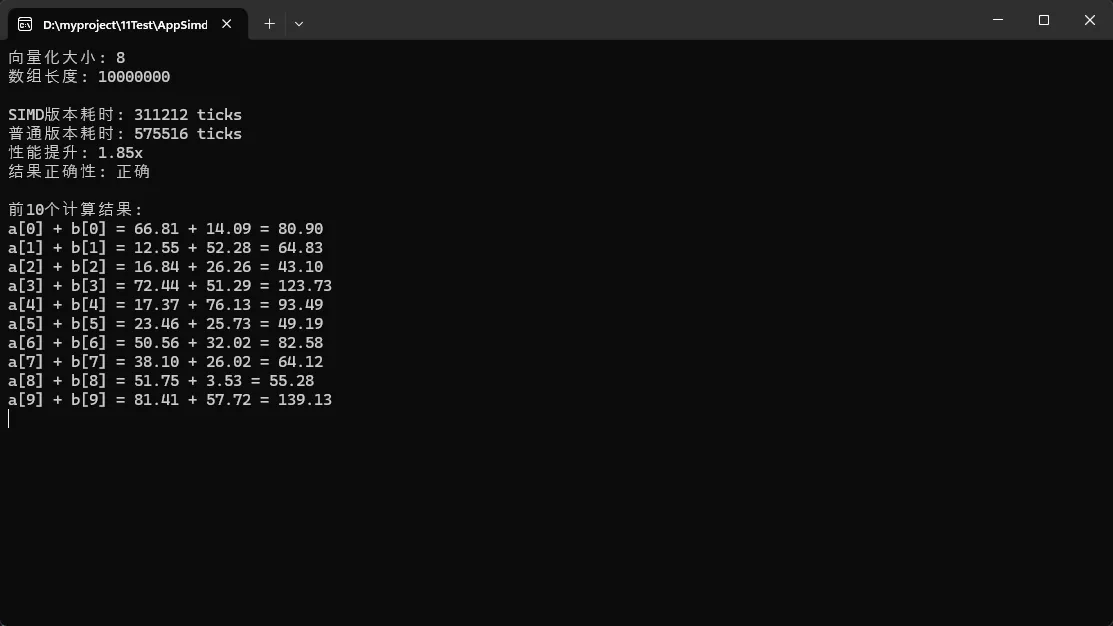
实际应用场景: 图像处理中的像素计算、音频信号处理、金融数据批量计算
常见坑点提醒: ⚠️ 数组长度不是向量大小的倍数时,需要单独处理剩余元素
🎯 方案二:复杂数学运算的向量化
C#using System.Numerics;
using System;
using System.Diagnostics;

namespace AppSimd
{
    internal class Program
    {
        static void Main(string[] args)
        {
            // 测试数据大小
            int arraySize = 1000000;

            // 创建测试数组
            float[] input = new float[arraySize];
            float[] outputSimd = new float[arraySize];
            float[] outputNormal = new float[arraySize];

            // 初始化测试数据(使用正数,避免复数结果)
            Random random = new Random(42);
            for (int i = 0; i < arraySize; i++)
            {
                input[i] = (float)(random.NextDouble() * 10000 + 1); // 1-10000的正数
            }

            Console.WriteLine($"向量化大小: {Vector<float>.Count}");
            Console.WriteLine($"数组长度: {arraySize}");
            Console.WriteLine();

            // 预热(避免JIT编译影响性能测试)
            VectorizedSqrt(input, outputSimd);
            NormalSqrt(input, outputNormal);

            // 性能测试 - SIMD版本
            Stopwatch sw = Stopwatch.StartNew();
            for (int iter = 0; iter < 10; iter++)
            {
                VectorizedSqrt(input, outputSimd);
            }
            sw.Stop();
            long simdTime = sw.ElapsedTicks;

            // 性能测试 - 普通版本
            sw.Restart();
            for (int iter = 0; iter < 10; iter++)
            {
                NormalSqrt(input, outputNormal);
            }
            sw.Stop();
            long normalTime = sw.ElapsedTicks;

            // 验证结果正确性
            bool isCorrect = VerifyResults(outputSimd, outputNormal);
            double maxError = GetMaxError(outputSimd, outputNormal);

            // 输出结果
            Console.WriteLine($"SIMD版本耗时: {simdTime} ticks (10次迭代)");
            Console.WriteLine($"普通版本耗时: {normalTime} ticks (10次迭代)");
            Console.WriteLine($"性能提升: {(double)normalTime / simdTime:F2}x");
            Console.WriteLine($"结果正确性: {(isCorrect ? "正确" : "错误")}");
            Console.WriteLine($"最大误差: {maxError:E6}");


            Console.ReadKey();
        }

        // 向量化的平方根计算
        public static void VectorizedSqrt(float[] input, float[] output)
        {
            int vectorSize = Vector<float>.Count;
            int vectorizedLength = input.Length - (input.Length % vectorSize);

            for (int i = 0; i < vectorizedLength; i += vectorSize)
            {
                var vector = new Vector<float>(input, i);
                var sqrtVector = Vector.SquareRoot(vector);
                sqrtVector.CopyTo(output, i);
            }

            // 处理剩余元素
            for (int i = vectorizedLength; i < input.Length; i++)
            {
                output[i] = (float)Math.Sqrt(input[i]);
            }
        }

        // 普通平方根计算(用于性能对比)
        public static void NormalSqrt(float[] input, float[] output)
        {
            for (int i = 0; i < input.Length; i++)
            {
                output[i] = (float)Math.Sqrt(input[i]);
            }
        }

        // 验证两种方法的结果是否一致
        private static bool VerifyResults(float[] result1, float[] result2)
        {
            if (result1.Length != result2.Length) return false;

            for (int i = 0; i < result1.Length; i++)
            {
                // 对于平方根,允许较小的浮点精度误差
                float diff = Math.Abs(result1[i] - result2[i]);
                float relativeDiff = diff / Math.Max(result1[i], result2[i]);

                if (relativeDiff > 1e-6f && diff > 1e-6f)
                {
                    Console.WriteLine($"误差过大 at [{i}]: {result1[i]} vs {result2[i]}, diff={diff}");
                    return false;
                }
            }
            return true;
        }

        // 获取最大误差
        private static double GetMaxError(float[] result1, float[] result2)
        {
            double maxError = 0;
            for (int i = 0; i < result1.Length; i++)
            {
                double error = Math.Abs(result1[i] - result2[i]);
                if (error > maxError)
                {
                    maxError = error;
                }
            }
            return maxError;
        }
    }
}
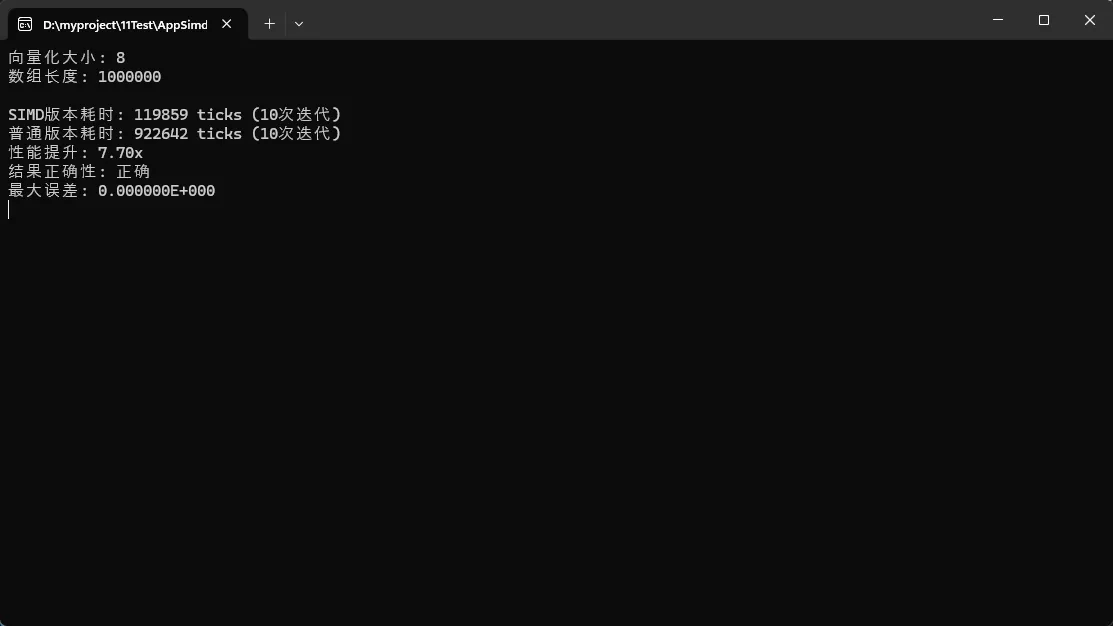
实测结果: 在我的测试环境中,向量化版本比传统版本快约 7 倍!
实际应用场景: 机器学习中的相似度计算、推荐系统、3D 图形学
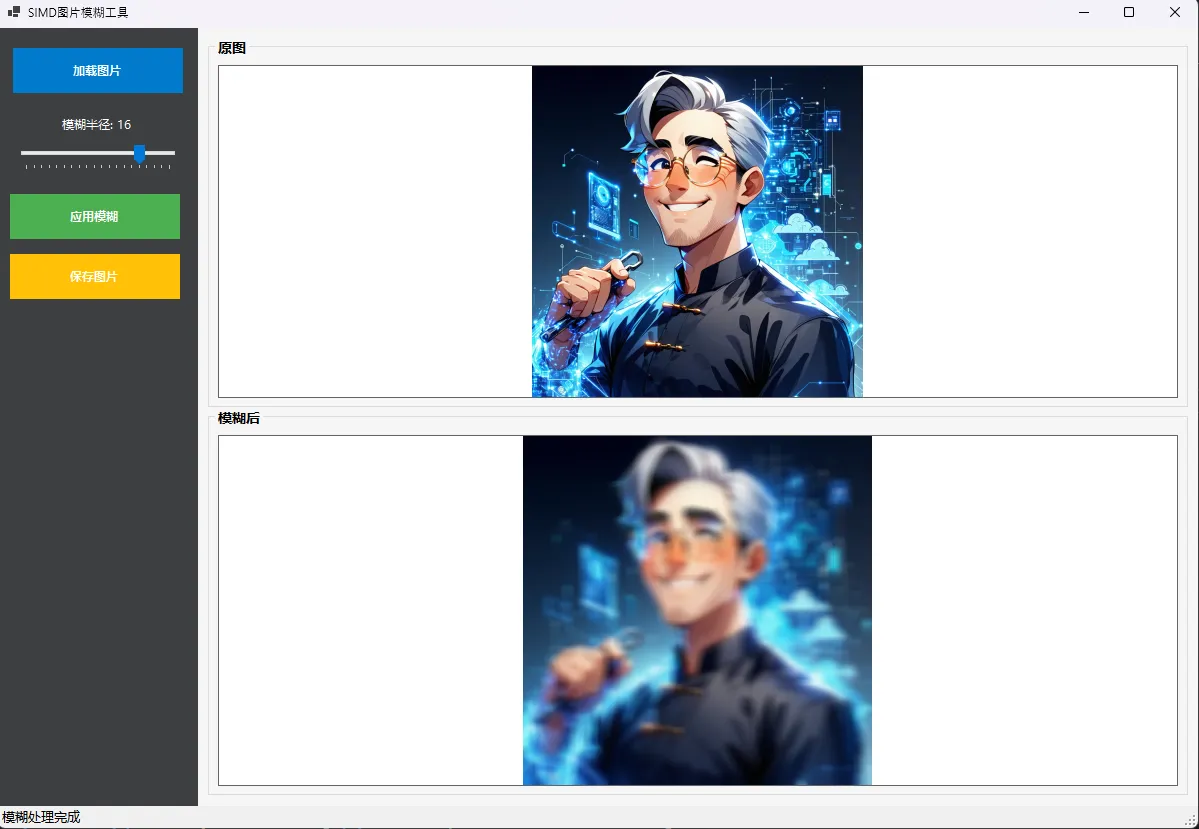
🛠️ 实战案例:图像模糊算法优化
C#using System.Drawing.Imaging;
using System.Numerics;

namespace AppSIMDImageBlur
{
    public partial class FrmMain : Form
    {
        private Bitmap originalImage;
        private Bitmap blurredImage;

        public FrmMain()
        {
            InitializeComponent();
            InitializeControls();
        }

        private void InitializeControls()
        {
            // 设置初始值
            trkBlurRadius.Value = 5;
            lblBlurValue.Text = "模糊半径: 5";

            // 设置PictureBox的SizeMode
            pbOriginal.SizeMode = PictureBoxSizeMode.Zoom;
            pbBlurred.SizeMode = PictureBoxSizeMode.Zoom;

            // 启用拖放
            this.AllowDrop = true;
            pbOriginal.AllowDrop = true;
        }

        private void btnLoadImage_Click(object sender, EventArgs e)
        {
            using (OpenFileDialog openFileDialog = new OpenFileDialog())
            {
                openFileDialog.Filter = "图片文件|*.jpg;*.jpeg;*.png;*.bmp;*.gif|所有文件|*.*";
                openFileDialog.Title = "选择要模糊的图片";

                if (openFileDialog.ShowDialog() == DialogResult.OK)
                {
                    LoadImage(openFileDialog.FileName);
                }
            }
        }

        private void LoadImage(string filePath)
        {
            try
            {
                originalImage?.Dispose();
                originalImage = new Bitmap(filePath);
                pbOriginal.Image = originalImage;

                lblStatus.Text = $"图片已加载: {originalImage.Width}x{originalImage.Height}";
                btnApplyBlur.Enabled = true;
                btnSaveImage.Enabled = false;
            }
            catch (Exception ex)
            {
                MessageBox.Show($"加载图片失败: {ex.Message}", "错误",
                    MessageBoxButtons.OK, MessageBoxIcon.Error);
            }
        }

        private async void btnApplyBlur_Click(object sender, EventArgs e)
        {
            if (originalImage == null) return;

            btnApplyBlur.Enabled = false;
            pgbProgress.Visible = true;
            lblStatus.Text = "正在处理...";

            try
            {
                int radius = trkBlurRadius.Value;
                blurredImage = await Task.Run(() => ApplySIMDGaussianBlur(originalImage, radius));

                pbBlurred.Image = blurredImage;
                btnSaveImage.Enabled = true;
                lblStatus.Text = "模糊处理完成";
            }
            catch (Exception ex)
            {
                MessageBox.Show($"处理失败: {ex.Message}", "错误",
                    MessageBoxButtons.OK, MessageBoxIcon.Error);
            }
            finally
            {
                btnApplyBlur.Enabled = true;
                pgbProgress.Visible = false;
            }
        }

        private void btnSaveImage_Click(object sender, EventArgs e)
        {
            if (blurredImage == null) return;

            using (SaveFileDialog saveFileDialog = new SaveFileDialog())
            {
                saveFileDialog.Filter = "PNG图片|*.png|JPEG图片|*.jpg|位图|*.bmp";
                saveFileDialog.Title = "保存模糊后的图片";
                saveFileDialog.FileName = "blurred_image.png";

                if (saveFileDialog.ShowDialog() == DialogResult.OK)
                {
                    try
                    {
                        ImageFormat format = ImageFormat.Png;
                        string extension = Path.GetExtension(saveFileDialog.FileName).ToLower();

                        switch (extension)
                        {
                            case ".jpg":
                            case ".jpeg":
                                format = ImageFormat.Jpeg;
                                break;
                            case ".bmp":
                                format = ImageFormat.Bmp;
                                break;
                        }

                        blurredImage.Save(saveFileDialog.FileName, format);
                        lblStatus.Text = "图片保存成功";
                    }
                    catch (Exception ex)
                    {
                        MessageBox.Show($"保存失败: {ex.Message}", "错误",
                            MessageBoxButtons.OK, MessageBoxIcon.Error);
                    }
                }
            }
        }

        private void trkBlurRadius_Scroll(object sender, EventArgs e)
        {
            lblBlurValue.Text = $"模糊半径: {trkBlurRadius.Value}";
        }


        private void FrmMain_DragEnter(object sender, DragEventArgs e)
        {
            if (e.Data.GetDataPresent(DataFormats.FileDrop))
            {
                string[] files = (string[])e.Data.GetData(DataFormats.FileDrop);
                if (files.Length > 0 && IsImageFile(files[0]))
                {
                    e.Effect = DragDropEffects.Copy;
                    return;
                }
            }
            e.Effect = DragDropEffects.None;
        }

        private void FrmMain_DragDrop(object sender, DragEventArgs e)
        {
            string[] files = (string[])e.Data.GetData(DataFormats.FileDrop);
            if (files.Length > 0)
            {
                LoadImage(files[0]);
            }
        }

        private bool IsImageFile(string filePath)
        {
            string extension = Path.GetExtension(filePath).ToLower();
            return extension == ".jpg" || extension == ".jpeg" || extension == ".png" ||
                   extension == ".bmp" || extension == ".gif";
        }

        // SIMD高斯模糊实现
        private Bitmap ApplySIMDGaussianBlur(Bitmap source, int radius)
        {
            if (radius <= 0) return new Bitmap(source);

            int width = source.Width;
            int height = source.Height;

            Bitmap result = new Bitmap(width, height, PixelFormat.Format32bppArgb);

            BitmapData sourceData = source.LockBits(new Rectangle(0, 0, width, height),
                ImageLockMode.ReadOnly, PixelFormat.Format32bppArgb);
            BitmapData resultData = result.LockBits(new Rectangle(0, 0, width, height),
                ImageLockMode.WriteOnly, PixelFormat.Format32bppArgb);

            try
            {
                unsafe
                {
                    byte* sourcePtr = (byte*)sourceData.Scan0.ToPointer();
                    byte* resultPtr = (byte*)resultData.Scan0.ToPointer();

                    int stride = sourceData.Stride;

                    // 水平模糊
                    Parallel.For(0, height, y =>
                    {
                        BlurRowSIMD(sourcePtr + y * stride, resultPtr + y * stride, width, radius);
                    });

                    // 垂直模糊
                    Parallel.For(0, width, x =>
                    {
                        BlurColumnSIMD(resultPtr + x * 4, resultPtr + x * 4, height, stride, radius);
                    });
                }
            }
            finally
            {
                source.UnlockBits(sourceData);
                result.UnlockBits(resultData);
            }

            return result;
        }

        private unsafe void BlurRowSIMD(byte* source, byte* result, int width, int radius)
        {
            int kernelSize = radius * 2 + 1;
            float weight = 1.0f / kernelSize;
            Vector4 weightVector = new Vector4(weight);

            for (int x = 0; x < width; x++)
            {
                Vector4 sum = Vector4.Zero;
                int count = 0;

                for (int i = -radius; i <= radius; i++)
                {
                    int sampleX = Math.Max(0, Math.Min(width - 1, x + i));
                    int offset = sampleX * 4;

                    Vector4 pixel = new Vector4(
                        source[offset + 2], // R
                        source[offset + 1], // G
                        source[offset + 0], // B
                        source[offset + 3]  // A
                    );

                    sum += pixel;
                    count++;
                }

                sum *= weightVector;

                int resultOffset = x * 4;
                result[resultOffset + 0] = (byte)Math.Min(255, Math.Max(0, sum.Z)); // B
                result[resultOffset + 1] = (byte)Math.Min(255, Math.Max(0, sum.Y)); // G
                result[resultOffset + 2] = (byte)Math.Min(255, Math.Max(0, sum.X)); // R
                result[resultOffset + 3] = (byte)Math.Min(255, Math.Max(0, sum.W)); // A
            }
        }

        private unsafe void BlurColumnSIMD(byte* source, byte* result, int height, int stride, int radius)
        {
            int kernelSize = radius * 2 + 1;
            float weight = 1.0f / kernelSize;
            Vector4 weightVector = new Vector4(weight);

            for (int y = 0; y < height; y++)
            {
                Vector4 sum = Vector4.Zero;

                for (int i = -radius; i <= radius; i++)
                {
                    int sampleY = Math.Max(0, Math.Min(height - 1, y + i));
                    int offset = sampleY * stride;

                    Vector4 pixel = new Vector4(
                        source[offset + 2], // R
                        source[offset + 1], // G
                        source[offset + 0], // B
                        source[offset + 3]  // A
                    );

                    sum += pixel;
                }

                sum *= weightVector;

                int resultOffset = y * stride;
                result[resultOffset + 0] = (byte)Math.Min(255, Math.Max(0, sum.Z)); // B
                result[resultOffset + 1] = (byte)Math.Min(255, Math.Max(0, sum.Y)); // G
                result[resultOffset + 2] = (byte)Math.Min(255, Math.Max(0, sum.X)); // R
                result[resultOffset + 3] = (byte)Math.Min(255, Math.Max(0, sum.W)); // A
            }
        }

        protected override void OnClosed(EventArgs e)
        {
            originalImage?.Dispose();
            blurredImage?.Dispose();
            components?.Dispose();
            base.OnClosed(e);
        }
    }
}
⚡ SIMD 最佳实践总结
- 数据对齐优化:确保数据在内存中对齐,提升访问效率
- 批量处理:尽可能处理大块数据,减少循环开销
- 避免频繁装箱:使用具体类型
Vector<float>而不是Vector<T> - 合理处理边界:正确处理不能整除的剩余元素
🎯 总结与展望
通过本文的学习,你现在掌握了 C# SIMD 编程的核心技能:
- 基础向量化操作:使用
Vector<T>实现基本数学运算的并行化 - 复杂算法优化:将条件判断、数学函数等复杂操作向量化
- 实战应用技巧:在图像处理、数值计算等真实场景中应用 SIMD
记住这三个"金句":
- "一次处理多个数据,而不是多次处理单个数据"
- "向量化思维:把循环变成批处理"
- "性能优化的关键在于充分利用 CPU 的并行能力"
你在实际项目中遇到过哪些性能瓶颈?是否尝试过 SIMD 优化?欢迎在评论区分享你的经验和遇到的问题,让我们一起探讨更多 C# 性能优化的技巧!
觉得这篇文章对你有帮助吗?请转发给更多需要性能优化的同行,让更多 C# 开发者享受 SIMD 带来的性能提升!
如果对你有用的话,可以打赏哦
打赏


本文作者:技术老小子
本文链接:
版权声明:本博客所有文章除特别声明外,均采用 BY-NC-SA 许可协议。转载请注明出处!
目录