
目录
作为C#开发者,你是否遇到过这样的困扰:用户希望自定义界面字体和颜色,但自己写选择器太复杂?或者想要快速实现类似Office软件那样的字体颜色选择功能?
今天我们来深入探讨C# WinForms中的FontDialog和ColorDialog——两个能让你的应用程序瞬间变得专业的神器!本文将通过实战案例,教你如何优雅地实现用户界面定制功能。
🔍 问题分析:为什么需要标准对话框?
在WinForms开发中,用户界面定制是提升用户体验的关键。传统做法是自己写颜色选择器和字体选择器,但这样做有三个致命问题:
- 开发成本高:需要大量代码实现复杂的UI逻辑
- 用户体验差:界面不统一,用户需要重新学习操作
- 兼容性问题:难以处理各种字体和颜色的边界情况
而使用系统标准对话框,用户熟悉操作流程,开发效率也大大提升。
🎯 解决方案:掌握两大核心对话框
🔤 FontDialog:让文字更有个性
FontDialog是字体选择的完美解决方案,它不仅能选择字体,还能同时设置大小、样式和颜色。
核心属性速览
C#FontDialog fontDialog = new FontDialog();
fontDialog.ShowColor = true;        // 显示颜色选择
fontDialog.FontMustExist = true;    // 只允许选择存在的字体
fontDialog.AllowVectorFonts = true; // 允许矢量字体
fontDialog.MaxSize = 72;            // 最大字号
fontDialog.MinSize = 8;             // 最小字号
实战案例:文本编辑器字体设置
C#namespace AppWinformColorFontDialog
{
    public partial class Form1 : Form
    {
        public Form1()
        {
            InitializeComponent();
        }

        private void btnFont_Click(object sender, EventArgs e)
        {
            using (FontDialog fontDialog = new FontDialog())
            {
                // 预设当前字体
                fontDialog.Font = textBox.SelectionFont ?? textBox.Font;
                fontDialog.Color = textBox.SelectionColor;
                fontDialog.ShowColor = true;

                // 限制字体范围,避免过大过小影响体验
                fontDialog.MinSize = 8;
                fontDialog.MaxSize = 72;
                fontDialog.FontMustExist = true;

                if (fontDialog.ShowDialog() == DialogResult.OK)
                {
                    // 应用到选中文本或全部文本
                    if (textBox.SelectionLength > 0)
                    {
                        textBox.SelectionFont = fontDialog.Font;
                        textBox.SelectionColor = fontDialog.Color;
                    }
                    else
                    {
                        textBox.Font = fontDialog.Font;
                        textBox.ForeColor = fontDialog.Color;
                    }
                }
            }
        }
    }
}
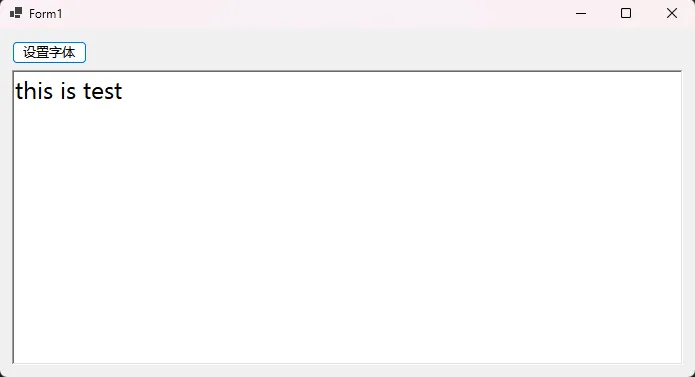
💡 开发技巧:
- 使用
using语句确保资源正确释放 - 预设当前字体提升用户体验
- 合理设置字体大小范围避免界面混乱
🎨 ColorDialog:色彩搭配的艺术
ColorDialog提供了丰富的颜色选择功能,支持标准颜色和自定义颜色。
核心属性详解
C#ColorDialog colorDialog = new ColorDialog();
colorDialog.AllowFullOpen = true;   // 允许自定义颜色
colorDialog.AnyColor = true;        // 显示所有系统颜色
colorDialog.FullOpen = true;        // 默认展开自定义颜色面板
colorDialog.CustomColors = customColorArray; // 预设自定义颜色
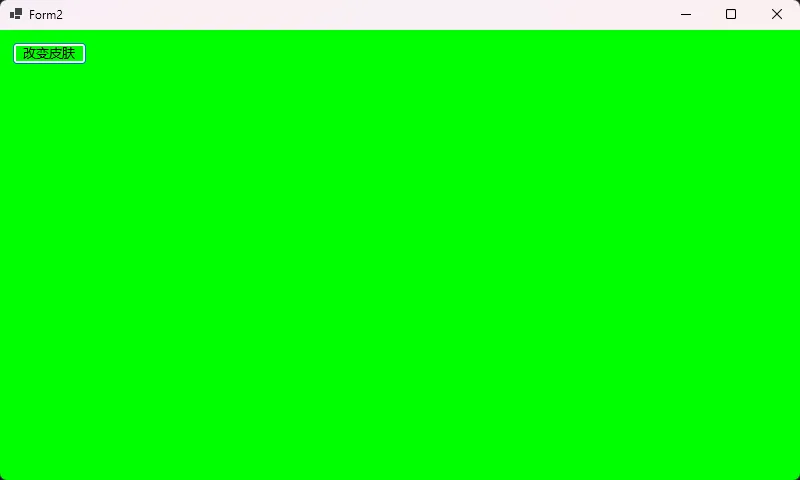
实战案例:主题配色方案
C#using System;
using System.Collections.Generic;
using System.Linq;
using System.Text;
using System.Threading.Tasks;

namespace AppWinformColorFontDialog
{
    public class ThemeManager
    {
        private int[] customColors = new int[16]; // 存储自定义颜色

        public bool SelectThemeColor(Control targetControl, string colorType)
        {
            using (ColorDialog colorDialog = new ColorDialog())
            {
                // 配置对话框
                colorDialog.AllowFullOpen = true;
                colorDialog.AnyColor = true;
                colorDialog.FullOpen = true;
                colorDialog.CustomColors = customColors;

                // 预设当前颜色
                switch (colorType.ToLower())
                {
                    case "background":
                        colorDialog.Color = targetControl.BackColor;
                        break;
                    case "foreground":
                        colorDialog.Color = targetControl.ForeColor;
                        break;
                }

                if (colorDialog.ShowDialog() == DialogResult.OK)
                {
                    // 应用选择的颜色
                    ApplyColor(targetControl, colorDialog.Color, colorType);

                    // 保存自定义颜色供下次使用
                    customColors = colorDialog.CustomColors;
                    return true;
                }

                return false;
            }
        }

        private void ApplyColor(Control control, Color color, string colorType)
        {
            switch (colorType.ToLower())
            {
                case "background":
                    control.BackColor = color;
                    break;
                case "backcolor":
                    control.BackColor = color;
                    break;
                case "foreground":
                    control.ForeColor = color;
                    break;
            }

            // 递归应用到子控件(可选)
            foreach (Control child in control.Controls)
            {
                ApplyColor(child, color, colorType);
            }
        }
    }
}
⚠️ 常见坑点与最佳实践
🚨 内存泄漏陷阱
C#// ❌ 错误做法:忘记释放资源
FontDialog fontDialog = new FontDialog();
if (fontDialog.ShowDialog() == DialogResult.OK)
{
    // 使用字体...
}
// fontDialog没有被释放!

// ✅ 正确做法:使用using语句
using (FontDialog fontDialog = new FontDialog())
{
    if (fontDialog.ShowDialog() == DialogResult.OK)
    {
        // 使用字体...
    }
} // 自动释放资源
🎯 用户体验优化技巧
C#using System;
using System.Collections.Generic;
using System.Linq;
using System.Text;
using System.Threading.Tasks;

namespace AppWinformColorFontDialog
{
    public class DialogHelper
    {
        public static void ShowFontDialog(Control control)
        {
            using (FontDialog dialog = new FontDialog())
            {
                // 💡 技巧1:预设当前值,让用户有参考
                dialog.Font = control.Font;
                dialog.Color = control.ForeColor;

                // 💡 技巧2:根据控件类型调整设置
                if (control is Label || control is Button)
                {
                    dialog.ShowColor = true; // UI控件通常需要颜色
                    dialog.FontMustExist = true; // 确保字体兼容性
                }

                // 💡 技巧3:合理的字体大小范围
                dialog.MinSize = control is Button ? 10 : 8;
                dialog.MaxSize = control.Size.Height / 2; // 避免字体过大

                if (dialog.ShowDialog() == DialogResult.OK)
                {
                    control.Font = dialog.Font;
                    control.ForeColor = dialog.Color;
                }
            }
        }
    }
}
🚀 进阶应用:打造专业配色工具
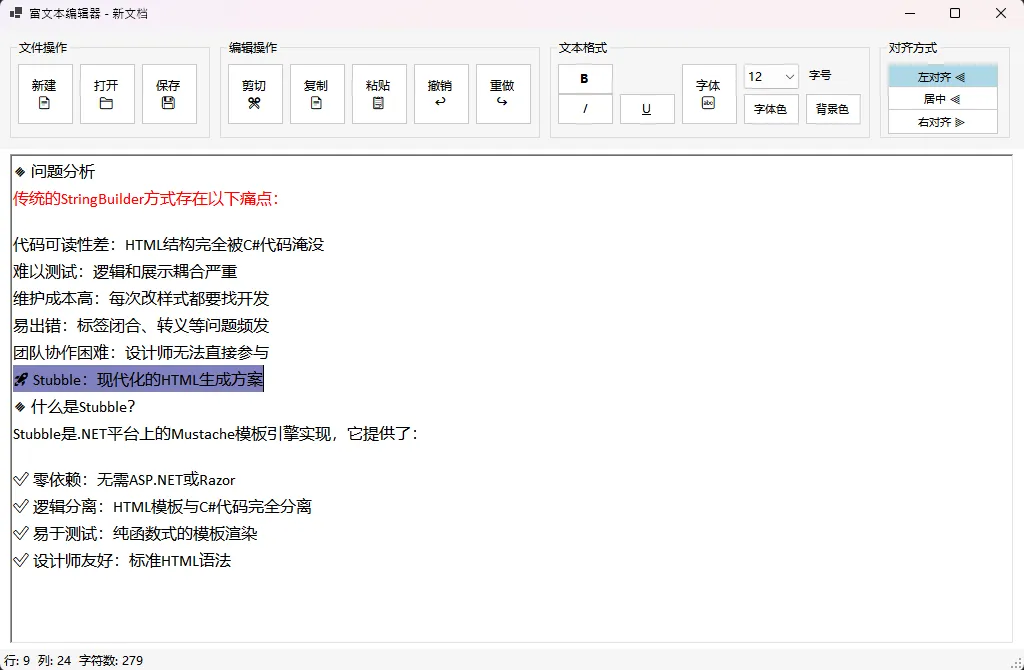
🎭 终极实战:富文本编辑器
C#using System;
using System.Drawing;
using System.IO;
using System.Windows.Forms;

namespace AppWinformColorFontDialog
{
    public partial class FrmRichTextEditor : Form
    {
        public FrmRichTextEditor()
        {
            InitializeComponent();
            InitializeEditor();
        }

        private void InitializeEditor()
        {
            // 设置默认字体
            rtbEditor.Font = new Font("微软雅黑", 12);
            rtbEditor.SelectionIndent = 0;
            rtbEditor.SelectionRightIndent = 0;

            // 更新状态栏
            UpdateStatusBar();

            // 绑定事件
            rtbEditor.SelectionChanged += RtbEditor_SelectionChanged;
            rtbEditor.TextChanged += RtbEditor_TextChanged;
        }

        private void RtbEditor_SelectionChanged(object sender, EventArgs e)
        {
            UpdateToolbarState();
            UpdateStatusBar();
        }

        private void RtbEditor_TextChanged(object sender, EventArgs e)
        {
            UpdateStatusBar();
        }

        private void UpdateToolbarState()
        {
            // 更新格式按钮状态
            btnBold.BackColor = rtbEditor.SelectionFont?.Bold == true ? Color.LightBlue : Color.White;
            btnItalic.BackColor = rtbEditor.SelectionFont?.Italic == true ? Color.LightBlue : Color.White;
            btnUnderline.BackColor = rtbEditor.SelectionFont?.Underline == true ? Color.LightBlue : Color.White;

            // 更新对齐按钮状态
            btnAlignLeft.BackColor = rtbEditor.SelectionAlignment == HorizontalAlignment.Left ? Color.LightBlue : Color.White;
            btnAlignCenter.BackColor = rtbEditor.SelectionAlignment == HorizontalAlignment.Center ? Color.LightBlue : Color.White;
            btnAlignRight.BackColor = rtbEditor.SelectionAlignment == HorizontalAlignment.Right ? Color.LightBlue : Color.White;
        }

        private void UpdateStatusBar()
        {
            int line = rtbEditor.GetLineFromCharIndex(rtbEditor.SelectionStart) + 1;
            int column = rtbEditor.SelectionStart - rtbEditor.GetFirstCharIndexFromLine(line - 1) + 1;

            lblStatus.Text = $"行: {line}  列: {column}  字符数: {rtbEditor.Text.Length}";
        }

        // 文件操作
        private void btnNew_Click(object sender, EventArgs e)
        {
            if (rtbEditor.Modified)
            {
                var result = MessageBox.Show("是否保存当前文档?", "新建",
                    MessageBoxButtons.YesNoCancel, MessageBoxIcon.Question);

                if (result == DialogResult.Yes)
                {
                    btnSave_Click(sender, e);
                }
                else if (result == DialogResult.Cancel)
                {
                    return;
                }
            }

            rtbEditor.Clear();
            rtbEditor.Modified = false;
            this.Text = "富文本编辑器 - 新文档";
        }

        private void btnOpen_Click(object sender, EventArgs e)
        {
            using (var dialog = new OpenFileDialog())
            {
                dialog.Filter = "Rich Text Format (*.rtf)|*.rtf|文本文件 (*.txt)|*.txt|所有文件 (*.*)|*.*";
                dialog.FilterIndex = 1;

                if (dialog.ShowDialog() == DialogResult.OK)
                {
                    try
                    {
                        if (Path.GetExtension(dialog.FileName).ToLower() == ".rtf")
                        {
                            rtbEditor.LoadFile(dialog.FileName);
                        }
                        else
                        {
                            rtbEditor.Text = File.ReadAllText(dialog.FileName);
                        }

                        rtbEditor.Modified = false;
                        this.Text = $"富文本编辑器 - {Path.GetFileName(dialog.FileName)}";
                    }
                    catch (Exception ex)
                    {
                        MessageBox.Show($"打开文件失败: {ex.Message}", "错误",
                            MessageBoxButtons.OK, MessageBoxIcon.Error);
                    }
                }
            }
        }

        private void btnSave_Click(object sender, EventArgs e)
        {
            using (var dialog = new SaveFileDialog())
            {
                dialog.Filter = "Rich Text Format (*.rtf)|*.rtf|文本文件 (*.txt)|*.txt";
                dialog.FilterIndex = 1;
                dialog.DefaultExt = "rtf";

                if (dialog.ShowDialog() == DialogResult.OK)
                {
                    try
                    {
                        if (Path.GetExtension(dialog.FileName).ToLower() == ".rtf")
                        {
                            rtbEditor.SaveFile(dialog.FileName);
                        }
                        else
                        {
                            File.WriteAllText(dialog.FileName, rtbEditor.Text);
                        }

                        rtbEditor.Modified = false;
                        this.Text = $"富文本编辑器 - {Path.GetFileName(dialog.FileName)}";

                        MessageBox.Show("保存成功!", "信息", MessageBoxButtons.OK, MessageBoxIcon.Information);
                    }
                    catch (Exception ex)
                    {
                        MessageBox.Show($"保存文件失败: {ex.Message}", "错误",
                            MessageBoxButtons.OK, MessageBoxIcon.Error);
                    }
                }
            }
        }

        // 格式化操作
        private void btnBold_Click(object sender, EventArgs e)
        {
            Font currentFont = rtbEditor.SelectionFont ?? rtbEditor.Font;
            FontStyle newStyle = currentFont.Style;

            newStyle = currentFont.Bold ? newStyle & ~FontStyle.Bold : newStyle | FontStyle.Bold;

            rtbEditor.SelectionFont = new Font(currentFont.FontFamily, currentFont.Size, newStyle);
            rtbEditor.Focus();
        }

        private void btnItalic_Click(object sender, EventArgs e)
        {
            Font currentFont = rtbEditor.SelectionFont ?? rtbEditor.Font;
            FontStyle newStyle = currentFont.Style;

            newStyle = currentFont.Italic ? newStyle & ~FontStyle.Italic : newStyle | FontStyle.Italic;

            rtbEditor.SelectionFont = new Font(currentFont.FontFamily, currentFont.Size, newStyle);
            rtbEditor.Focus();
        }

        private void btnUnderline_Click(object sender, EventArgs e)
        {
            Font currentFont = rtbEditor.SelectionFont ?? rtbEditor.Font;
            FontStyle newStyle = currentFont.Style;

            newStyle = currentFont.Underline ? newStyle & ~FontStyle.Underline : newStyle | FontStyle.Underline;

            rtbEditor.SelectionFont = new Font(currentFont.FontFamily, currentFont.Size, newStyle);
            rtbEditor.Focus();
        }

        private void btnFont_Click(object sender, EventArgs e)
        {
            using (var dialog = new FontDialog())
            {
                dialog.ShowColor = true;
                dialog.Font = rtbEditor.SelectionFont ?? rtbEditor.Font;
                dialog.Color = rtbEditor.SelectionColor;

                if (dialog.ShowDialog() == DialogResult.OK)
                {
                    rtbEditor.SelectionFont = dialog.Font;
                    rtbEditor.SelectionColor = dialog.Color;
                }
            }
            rtbEditor.Focus();
        }

        private void btnFontColor_Click(object sender, EventArgs e)
        {
            using (var dialog = new ColorDialog())
            {
                dialog.FullOpen = true;
                dialog.Color = rtbEditor.SelectionColor;

                if (dialog.ShowDialog() == DialogResult.OK)
                {
                    rtbEditor.SelectionColor = dialog.Color;
                }
            }
            rtbEditor.Focus();
        }

        private void btnBackColor_Click(object sender, EventArgs e)
        {
            using (var dialog = new ColorDialog())
            {
                dialog.FullOpen = true;
                dialog.Color = rtbEditor.SelectionBackColor;

                if (dialog.ShowDialog() == DialogResult.OK)
                {
                    rtbEditor.SelectionBackColor = dialog.Color;
                }
            }
            rtbEditor.Focus();
        }

        // 对齐操作
        private void btnAlignLeft_Click(object sender, EventArgs e)
        {
            rtbEditor.SelectionAlignment = HorizontalAlignment.Left;
            rtbEditor.Focus();
        }

        private void btnAlignCenter_Click(object sender, EventArgs e)
        {
            rtbEditor.SelectionAlignment = HorizontalAlignment.Center;
            rtbEditor.Focus();
        }

        private void btnAlignRight_Click(object sender, EventArgs e)
        {
            rtbEditor.SelectionAlignment = HorizontalAlignment.Right;
            rtbEditor.Focus();
        }

        // 编辑操作
        private void btnCut_Click(object sender, EventArgs e)
        {
            rtbEditor.Cut();
        }

        private void btnCopy_Click(object sender, EventArgs e)
        {
            rtbEditor.Copy();
        }

        private void btnPaste_Click(object sender, EventArgs e)
        {
            rtbEditor.Paste();
        }

        private void btnUndo_Click(object sender, EventArgs e)
        {
            rtbEditor.Undo();
        }

        private void btnRedo_Click(object sender, EventArgs e)
        {
            rtbEditor.Redo();
        }

        // 字体大小改变
        private void cmbFontSize_SelectedIndexChanged(object sender, EventArgs e)
        {
            if (float.TryParse(cmbFontSize.Text, out float fontSize) && fontSize > 0)
            {
                Font currentFont = rtbEditor.SelectionFont ?? rtbEditor.Font;
                rtbEditor.SelectionFont = new Font(currentFont.FontFamily, fontSize, currentFont.Style);
            }
            rtbEditor.Focus();
        }

        protected override void OnFormClosing(FormClosingEventArgs e)
        {
            if (rtbEditor.Modified)
            {
                var result = MessageBox.Show("是否保存当前文档?", "退出",
                    MessageBoxButtons.YesNoCancel, MessageBoxIcon.Question);

                if (result == DialogResult.Yes)
                {
                    btnSave_Click(this, EventArgs.Empty);
                }
                else if (result == DialogResult.Cancel)
                {
                    e.Cancel = true;
                }
            }

            base.OnFormClosing(e);
        }
    }
}
📚 总结
通过本文的深入讲解,我们掌握了C# WinForms中FontDialog和ColorDialog的核心使用技巧:
- 合理配置属性:根据应用场景选择合适的对话框属性设置
- 注意资源管理:使用
using语句避免内存泄漏 - 优化用户体验:预设当前值、限制合理范围、保存用户偏好
这两个对话框不仅能让你的应用程序更加专业,还能大大减少开发工作量。记住,好的用户界面不是炫技,而是让用户用得舒服。
你在使用FontDialog或ColorDialog时遇到过什么有趣的问题? 欢迎在评论区分享你的开发经验和创意用法!
如果这篇文章帮到了你,请转发给更多需要的C#同行! 让我们一起提升开发效率,创造更好的用户体验。
#C#开发 #WinForms #编程技巧 #用户界面
相关信息
通过网盘分享的文件:AppWinformColorFontDialog.zip 链接: https://pan.baidu.com/s/13pe_cDraFNFQA0N-RWoXGA?pwd=f5na 提取码: f5na --来自百度网盘超级会员v9的分享


本文作者:技术老小子
本文链接:
版权声明:本博客所有文章除特别声明外,均采用 BY-NC-SA 许可协议。转载请注明出处!