在Windows系统下的Python开发中,串口通信是连接物理设备与软件系统的重要桥梁。无论你是在开发工业自动化系统、物联网项目,还是需要与单片机、传感器进行数据交换,掌握Python串口通信技术都是必不可少的技能。
本文将通过一个完整的串口通信工具案例,带你深入理解从基础连接到高级数据处理的全套解决方案。我们不仅要实现基本的数据收发功能,还要处理异步通信、协议解析、日志记录等实战中的关键问题,让你的Python上位机开发能力更上一层楼。
🔍 串口通信的核心挑战分析
问题一:阻塞式通信影响用户体验
传统的串口读取是阻塞式的,会导致界面卡顿,用户体验极差。特别是在需要持续接收数据的场景下,如何保证界面响应性是首要问题。
问题二:数据包边界处理复杂
实际应用中,串口数据往往不是完整的数据包,需要处理数据粘包、分包等情况,如何正确解析协议数据是技术难点。
问题三:错误处理和资源管理
设备断开、端口占用、读写异常等错误情况频发,需要完善的异常处理机制和资源清理策略。
🚀 现代化解决方案架构
🏗️ 分层架构设计
我们采用分层架构来解决上述问题:
Python# 配置层:统一管理连接参数
class SerialConfig:
    def __init__(self, port, baudrate):
        self.port = port
        self.baudrate = baudrate
设计亮点:将配置独立成类,便于扩展更多参数(如数据位、停止位等),也方便配置的序列化保存。
⚡ 异步处理核心引擎
Pythonclass AsyncSerialHandler:
    def __init__(self, config: SerialConfig):
        self.config = config
        self.serial = None
        self.is_connected = False
        # 关键:使用回调机制解耦UI和通信逻辑
        self.on_data_received = None
        self.on_error = None
        self.on_connection_changed = None
        self.tx_bytes = 0
        self.rx_bytes = 0
        self.read_task = None
核心技巧:
- 回调函数设计:通过
on_data_received等回调函数,实现通信层与UI层的完全解耦 - 统计功能内置:直接在处理器中维护收发字节统计,避免外部重复计算
- 任务管理:使用
read_task管理异步读取任务的生命周期
在Python桌面应用开发中,图片显示是最常见也是最容易踩坑的功能之一。你是否遇到过这样的问题:使用Tkinter显示图片时,只支持有限的格式?想要显示JPG、PNG等常见格式却总是报错?或者图片尺寸过大导致界面布局混乱?
本文将深入解析Python Tkinter中的两种主要图片显示方案:原生PhotoImage和PIL图片处理,通过实战案例帮你彻底解决图片显示的各种问题,让你的Python上位机开发更加得心应手。
🔍 问题分析:Tkinter图片显示的核心痛点
📋 PhotoImage的局限性
Tkinter原生的PhotoImage组件存在以下限制:
- 格式支持有限:仅支持GIF和PPM/PGM格式
- 功能单一:无法进行图片缩放、旋转等操作
- 兼容性差:对现代图片格式支持不足
🎯 实际开发需求
在实际Python开发项目中,我们通常需要:
- 显示JPG、PNG、BMP等主流格式
- 动态调整图片尺寸适应界面
- 对图片进行基本的处理操作
💡 解决方案:双管齐下的技术路线
🚀 方案一:原生PhotoImage(基础应用)
适用于简单的GIF动图显示和基础图片需求。
🔥 方案二:PIL + ImageTk(推荐方案)
通过Pillow库扩展Tkinter的图片处理能力,实现全格式支持。
🛠️ 代码实战
📦 环境准备
Python# 安装必要的库
pip install pillow

# 导入模块
import tkinter as tk
from tkinter import ttk, filedialog, messagebox
from PIL import Image, ImageTk
import os
🎨 方案一:PhotoImage基础应用
Pythonimport tkinter as tk
from tkinter import ttk, filedialog, messagebox
from PIL import Image, ImageTk
import os


class PhotoImageDemo:
    def __init__(self):
        self.root = tk.Tk()
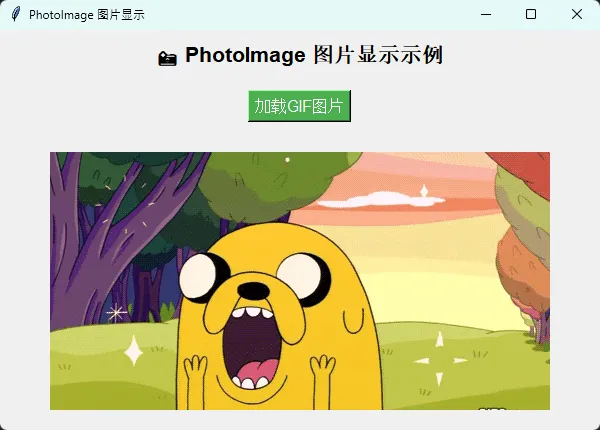
        self.root.title("PhotoImage 图片显示")
        self.root.geometry("600x400")

        # 创建显示区域
        self.setup_ui()

    def setup_ui(self):
        """设置用户界面"""
        # 标题
        title_label = tk.Label(
            self.root,
            text="📸 PhotoImage 图片显示示例",
            font=("Arial", 16, "bold")
        )
        title_label.pack(pady=10)

        # 按钮框架
        button_frame = tk.Frame(self.root)
        button_frame.pack(pady=10)

        # 加载GIF按钮
        load_gif_btn = tk.Button(
            button_frame,
            text="加载GIF图片",
            command=self.load_gif_image,
            bg="#4CAF50",
            fg="white",
            font=("Arial", 12)
        )
        load_gif_btn.pack(side=tk.LEFT, padx=5)

        # 图片显示标签
        self.image_label = tk.Label(
            self.root,
            text="请选择GIF图片进行显示",
            bg="#f0f0f0",
            width=50,
            height=15
        )
        self.image_label.pack(pady=20, expand=True, fill=tk.BOTH)

    def load_gif_image(self):
        """加载并显示GIF图片"""
        try:
            # 选择文件
            file_path = filedialog.askopenfilename(
                title="选择GIF图片",
                filetypes=[("GIF files", "*.gif"), ("All files", "*.*")]
            )

            if file_path:
                # 创建PhotoImage对象
                photo = tk.PhotoImage(file=file_path)

                # 显示图片
                self.image_label.configure(image=photo, text="")
                self.image_label.image = photo  # 保持引用,防止垃圾回收

                print(f"✅ 成功加载图片:{os.path.basename(file_path)}")

        except Exception as e:
            messagebox.showerror("错误", f"加载图片失败:{str(e)}")
            print(f"❌ 图片加载失败:{e}")

    def run(self):
        """启动应用"""
        self.root.mainloop()


# 使用示例
if __name__ == "__main__":
    app = PhotoImageDemo()
    app.run()
在当今物联网和智能设备的浪潮中,Python作为最受欢迎的编程语言之一,在串口通讯领域展现出了强大的实力。无论是上位机开发、工业自动化,还是嵌入式系统集成,Python凭借其丰富的PySerial库和简洁的语法,成为了众多开发者的首选。然而,在实际项目中,许多开发者仍然面临着数据粘包、异步处理、错误检测等技术难题。本文将从实战角度出发,深入解析Python串口通讯的核心技术与最佳实践,让您真正掌握串口数据处理的艺术与技巧。
🔧 Python串口通讯基础:从连接到数据传输
PySerial库的高效配置
PySerial是Python中最成熟的串口通信库,为开发者提供了完整的串口操作接口。正确的初始化配置是成功通信的基础:
Pythonimport serial
import serial.tools.list_ports
import threading
import time
from typing import Optional, Callable

class SerialManager:
    def __init__(self, port: str = None, baudrate: int = 9600):
        """
        初始化串口管理器

        Args:
            port: 串口名称,如 'COM3' 或 '/dev/ttyUSB0'
            baudrate: 波特率,常用值:9600, 115200
        """
        self.port = port
        self.baudrate = baudrate
        self.serial_port: Optional[serial.Serial] = None
        self.is_connected = False
        self.read_thread: Optional[threading.Thread] = None
        self.stop_reading = threading.Event()

    @staticmethod
    def get_available_ports():
        """获取系统可用串口列表"""
        ports = serial.tools.list_ports.comports()
        return [port.device for port in ports]

    def connect(self) -> bool:
        """建立串口连接"""
        try:
            self.serial_port = serial.Serial(
                port=self.port,
                baudrate=self.baudrate,
                bytesize=serial.EIGHTBITS,
                parity=serial.PARITY_NONE,
                stopbits=serial.STOPBITS_ONE,
                timeout=1,  # 读取超时时间
                write_timeout=1,  # 写入超时时间
                xonxoff=False,  # 软件流控
                rtscts=False,  # 硬件流控
                dsrdtr=False
            )

            # 清空缓冲区
            self.serial_port.flushInput()
            self.serial_port.flushOutput()

            self.is_connected = True
            print(f"✅ 串口 {self.port} 连接成功,波特率: {self.baudrate}")
            return True

        except Exception as e:
            print(f"❌ 串口连接失败: {e}")
            return False
在Python开发中,字符串格式化是最常用的操作之一。无论是Windows桌面应用开发、上位机数据处理,还是日志输出,我们都离不开字符串格式化。面对Python提供的三种主流格式化方式——f-strings、str.format()和百分号格式化(%),很多开发者会困惑:到底该用哪种?性能差距有多大?在实际项目中如何选择?
本文将从实战角度出发,通过详细的代码示例和性能测试,帮你彻底掌握Python字符串格式化的精髓,让你在面对不同场景时能够做出最优选择。
🔍 三种格式化方式深度解析
💫 f-strings:Python 3.6+的现代化选择
f-strings(格式化字符串字面量)是Python 3.6引入的最新格式化语法,以其简洁和高效著称。
基础语法:
Pythonname = "张三"
age = 25
score = 95.678

# 基本用法
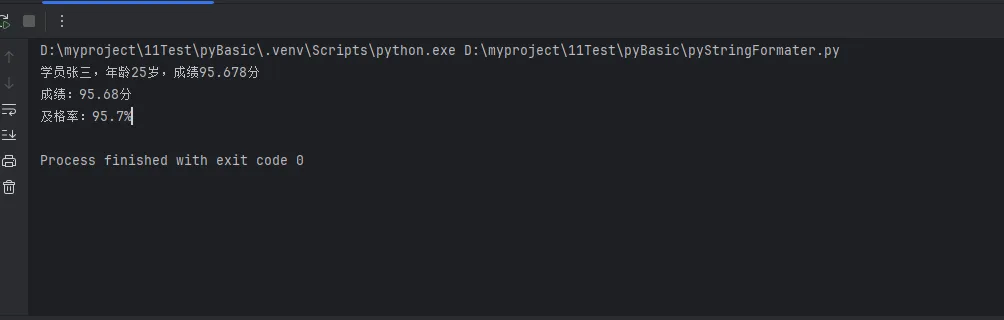
message = f"学员{name},年龄{age}岁,成绩{score}分"
print(message)

# 格式控制
formatted_score = f"成绩:{score:.2f}分"  # 保留2位小数
print(formatted_score)

# 表达式计算
total_students = 100
pass_rate = f"及格率:{(score/100)*100:.1f}%"
print(pass_rate)
在Python GUI开发中,Tkinter作为Python标准库中最重要的图形界面工具包,几乎是每个Python开发者都会接触到的技术。然而,许多开发者在使用Tkinter时常常遇到一个尴尬的问题:界面丑陋、控件单调、用户体验差。
默认的Tkinter界面往往给人一种"上世纪90年代"的感觉,这让很多开发者望而却步,转向其他GUI框架。但实际上,通过掌握正确的控件属性配置和美化技巧,Tkinter完全可以创建出现代化、美观的专业级应用界面。
本文将从实战角度出发,详细介绍Tkinter常用控件的核心属性,并提供一系列经过验证的美化技巧,帮助你快速提升Python GUI应用的视觉效果和用户体验。
🔍 问题分析:为什么Tkinter界面总是很丑?
常见问题盘点
- 默认样式过时:灰色背景、单调边框、缺乏视觉层次
- 控件属性复杂:参数众多,不知如何合理配置
- 布局管理混乱:控件摆放不当,界面缺乏统一性
- 缺乏交互反馈:按钮、输入框等控件交互体验差
根本原因
Tkinter设计之初更注重功能性而非美观性,默认样式确实比较简陋。但通过深入了解控件属性和合理的配置策略,完全可以解决这些问题。
💡 解决方案:掌握核心控件属性体系
🎨 颜色属性系统
Tkinter中的颜色配置是美化的基础,主要包括以下属性:
Python# 基础颜色属性
bg='#f0f0f0'           # 背景色 (background)
fg='#333333'           # 前景色/文字颜色 (foreground)
activebackground='#e0e0e0'  # 激活时背景色
activeforeground='#000000'  # 激活时前景色
selectbackground='#0078d4'  # 选中时背景色
selectforeground='white'    # 选中时前景色
最佳实践:建立统一的色彩方案,避免使用过多颜色造成视觉混乱。
📏 尺寸与边距属性
Python# 尺寸控制
width=20               # 宽度(字符单位或像素)
height=2               # 高度(字符单位或像素)

# 内边距控制
padx=10               # 水平内边距
pady=5                # 垂直内边距
ipadx=5               # 内部水平填充
ipady=3               # 内部垂直填充
🖋️ 字体属性配置
Python# 字体设置
font=('微软雅黑', 12, 'normal')  # (字体名称, 大小, 样式)
# 样式选项:'normal', 'bold', 'italic'

# 实用字体配置示例
FONT_TITLE = ('微软雅黑', 16, 'bold')
FONT_CONTENT = ('微软雅黑', 10, 'normal')
FONT_BUTTON = ('微软雅黑', 9, 'normal')
🖼️ 边框与外观属性
Pythonrelief='flat'          # 边框样式:flat, raised, sunken, groove, ridge
borderwidth=1          # 边框宽度
highlightthickness=0   # 高亮边框厚度(去除焦点框)
🛠️ 代码实战:常用控件美化实例
🏷️ Label标签美化
Pythonimport tkinter as tk
from tkinter import ttk

# 创建主窗口
root = tk.Tk()
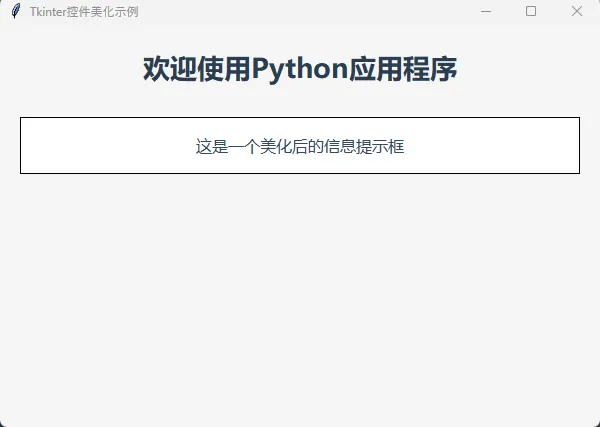
root.title("Tkinter控件美化示例")
root.geometry("600x400")
root.configure(bg='#f5f5f5')

# 标题标签 - 现代化设计
title_label = tk.Label(
    root,
    text="欢迎使用Python应用程序",
    font=('微软雅黑', 20, 'bold'),
    fg='#2c3e50',
    bg='#f5f5f5',
    pady=20
)
title_label.pack()

# 信息标签 - 卡片样式
info_frame = tk.Frame(root, bg='white', relief='solid', bd=1)
info_frame.pack(pady=10, padx=20, fill='x')

info_label = tk.Label(
    info_frame,
    text="这是一个美化后的信息提示框",
    font=('微软雅黑', 12, 'normal'),
    fg='#34495e',
    bg='white',
    pady=15,
    padx=20
)
info_label.pack()

# 启动主循环
if __name__ == "__main__":
    root.mainloop()