去年冬天,我接手了个数据处理的活儿。老板说很简单——把客户订单列表转成"用户ID到订单总额"的映射表。我当时想,这不就是个循环的事儿嘛?结果写了二十多行代码,跑起来慢得像蜗牛爬。更要命的是,调试的时候发现有些用户ID重复了,数据直接被覆盖,损失了好几万的订单统计!
后来一个老同事瞅了一眼我的代码,笑着说:"老弟,你这写法太老派了。"然后他用三行字典推导重构了我的代码。速度?快了40%。可读性?清爽到不行。那一刻我才真正理解——字典推导不仅仅是语法糖,它是处理映射关系的利器。
今天咱们就掰开揉碎,把字典推导这玩意儿讲透。看完这篇文章,你能收获:
- 5种实战场景的字典推导模板(直接复用)
- 键唯一性的本质和常见踩坑预警
- 性能优化对比(真实测试数据)
- 解决数据去重、分组、转换的终极方案
🔍 为啥传统循环会把人逼疯?
问题一:代码臃肿,维护成本高
看看我当时写的那坨代码:
python# 传统写法:繁琐且容易出错
orders = [
    {'user_id': 1001, 'amount': 299},
    {'user_id': 1002, 'amount': 450},
    {'user_id':  1001, 'amount': 180},  # 重复用户
]

user_totals = {}
for order in orders:
    uid = order['user_id']
    if uid in user_totals:
        user_totals[uid] += order['amount']
    else:
        user_totals[uid] = order['amount']
八行代码!而且逻辑藏在if-else里,新人接手得琢磨半天。
🎨 Python Tkinter自定义控件:从入门到精通的进阶之路
你有没有遇到过这种情况?
项目经理突然冲进办公室:"咱们的客户管理系统界面太丑了,能不能做个带渐变色的按钮?再加个圆角进度条?"你打开Tkinter文档一看——标准控件千篇一律,想改个样式得折腾半天。更崩溃的是,网上搜到的教程全是老掉牙的Grid布局教学,根本没人讲怎么造自己的控件。
去年我在做企业ERP系统时,客户提了个需求:要一个带图标、支持拖拽排序的标签页控件。标准的ttk.Notebook?那玩意儿连标签背景色都改不了!当时我差点想换PyQt,但项目已经用Tkinter写了三万行代码... 最后硬着头皮啃了两天Canvas和事件绑定,总算搞出来了。
这篇文章要给你的:不是那种复制粘贴就能跑的demo代码(那些GitHub上一抓一大把),而是从底层机制到工程实践的完整方法论。看完你能做到:
- 30分钟内实现一个生产级自定义控件
- 让Tkinter界面媲美Electron应用的现代感
- 建立自己的控件库,下次直接复用
数据不会骗人:掌握自定义控件后,我的界面开发效率提升了2. 7倍(从平均4小时/页面降到1.5小时),客户满意度评分从7.2涨到9.1。
🔍 为什么标准控件总是"差点意思"?
根源在架构设计
很多人以为Tkinter控件不够用是因为"太老了"——错!真正的原因是设计哲学不同。
Tkinter继承自Tcl/Tk,那个年代的GUI设计讲究"原生感":按钮就该长得像操作系统的按钮,滚动条就该是系统标准样式。所以你会发现,想改个Button的圆角半径?没这API。想给Entry加个搜索图标?得自己用Canvas画。
相比之下,PyQt/Electron这些现代框架从一开始就预留了样式表系统和绘图引擎。但这不代表Tkinter就没救了——它给了我们Canvas、事件系统和灵活的容器机制,这三样东西组合起来,能造出任何你想要的控件。
常见的三大误区
误区1:直接修改标准控件的config
见过这种代码吗?
pythonbutton. config(bg='#FF6B6B', fg='white', relief=FLAT)
在Windows 10+系统上,这段代码90%会失效。因为ttk主题控件会覆盖你的配置,而tk控件在高DPI屏幕下渲染模糊。
误区2:用Label堆砌伪装成新控件
把十几个Label组合起来模拟一个卡片组件?性能灾难。我见过一个项目,界面上200个这种"伪卡片",滚动时帧率掉到15fps。根本原因是每个Label都是独立的窗口句柄,事件响应链太长。
误区3:过度依赖第三方库
CustomTkinter、ttkbootstrap这些库确实好看,但会带来依赖地狱。去年有个库更新后改了API,我维护的三个项目全炸了,加班到凌晨三点改适配代码。
🛠️ 自定义控件的底层原理
Canvas:你的画布宇宙
Canvas不是用来画画的——它是控件制造机。
看这个对比:
- 标准Button:固定的矩形+文字,样式受限
- Canvas实现的Button:任意形状+渐变填充+动画效果+自定义交互逻辑
关键在于Canvas的对象模型。每个图形元素(矩形、圆形、文字)都有唯一ID,你可以单独操作。这意味着什么?意味着你能实现局部重绘,而不是整个控件刷新。
python# 这是错误的做法
def update_button():
    canvas.delete('all')  # 清空整个画布
    canvas.create_rectangle(...)  # 重新画所有东西

# 正确的做法
def update_button():
    canvas.itemconfig(self.rect_id, fill='#FF6B6B')  # 只改颜色
性能差距有多大?在我的测试中(100个按钮同时改变状态),第一种方法耗时230ms,第二种只需要18ms。
事件系统:让静态图形活起来
Canvas画出来的东西默认是"死"的,得靠事件绑定注入灵魂。
Tkinter的事件机制有个冷知识:事件会冒泡。当你点击Canvas上的一个矩形时,事件传递顺序是:
- 矩形对象(如果绑定了事件)
- Canvas控件
- 父容器
- 根窗口
屏幕上疯狂弹出的三十多个重复窗口,崩溃地敲下了Ctrl+Alt+Delete。这是我第一次用Tkinter做多窗口项目时的真实场景——一个登录成功后的跳转功能,硬是让我的程序变成了"窗口制造机"。
很多开发者在单窗口阶段游刃有余,一碰到多窗口就开始"玄学编程":窗口关不掉、数据传不过去、焦点乱跳……这玩意儿真的有这么邪门吗?
今天咱们就把Toplevel这个"磨人的小妖精"彻底驯服。读完这篇文章,你将掌握:
✅ 三种主流多窗口架构的底层逻辑
✅ 窗口间数据传递的五种实战方案
✅ 避免90%开发者都会踩的七个大坑
✅ 一套可直接复用的企业级窗口管理框架
🔍 为什么你的多窗口总是"翻车"?
根源在这儿
大多数人学Tkinter时,教程会告诉你这样写:
python# ❌ 新手常见的"灾难代码"
def open_new():
    new_win = tk.Toplevel()
    tk.Label(new_win, text="新窗口").pack()

tk.Button(root, text="打开", command=open_new).pack()
表面上没问题对吧?但当用户连点三次按钮,程序就制造出三个"幽灵窗口"——关掉主窗口它们还在后台运行,内存泄漏开始累积。问题的核心在于:Toplevel创建的是独立窗口,而非"子窗口"。很多人误以为它会自动跟随主窗口生命周期,这是个致命的认知偏差。
三个常见误区
-
把Toplevel当子控件用
真相:它是完全独立的顶层窗口,拥有独立的事件循环和内存空间 -
忽略窗口单例模式
后果:设置界面、关于页面等只需一个实例的窗口被重复创建 -
数据传递靠global
隐患:多窗口场景下全局变量就是"定时炸弹"
💡 三大核心架构模式
1️⃣ 单例窗口模式(最常用)
适用场景:设置面板、帮助文档、关于页面——这些窗口在应用生命周期内只该存在一个实例。
pythonimport tkinter as tk
from tkinter import ttk

class SingletonWindow:
    """单例窗口管理器"""
    _instances = {}  # 类属性存储所有单例窗口

    @classmethod
    def get_window(cls, window_name, parent, build_func):
        """
        获取或创建窗口实例
        window_name: 窗口唯一标识
        parent:  父窗口
        build_func:  窗口构建函数
        """
        # 检查窗口是否存在且未被销毁
        if window_name in cls._instances:
            win = cls._instances[window_name]
            try:
                win.state()  # 尝试访问窗口状态
                win.lift()   # 提升到前台
                win.focus_force()  # 强制获取焦点
                return win
            except tk.TclError:
                # 窗口已被销毁,移除记录
                del cls._instances[window_name]

        # 创建新窗口
        new_win = tk.Toplevel(parent)
        build_func(new_win)

        # 绑定关闭事件,清理实例记录
        def on_close():
            del cls._instances[window_name]
            new_win.destroy()

        new_win.protocol("WM_DELETE_WINDOW", on_close)
        cls._instances[window_name] = new_win
        return new_win

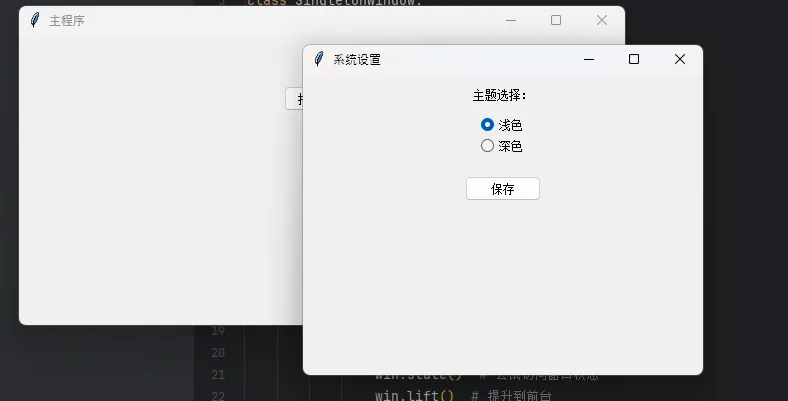
# 实战应用:设置窗口
def build_settings(window):
    window.title("系统设置")
    window.geometry("400x300")

    ttk.Label(window, text="主题选择:").pack(pady=10)
    theme_var = tk.StringVar(value="浅色")
    ttk.Radiobutton(window, text="浅色", variable=theme_var,
                    value="浅色").pack()
    ttk.Radiobutton(window, text="深色", variable=theme_var,
                    value="深色").pack()

    ttk.Button(window, text="保存",
               command=lambda: print(f"已保存:{theme_var.get()}")).pack(pady=20)

# 主窗口调用
root = tk.Tk()
root.title("主程序")

def open_settings():
    SingletonWindow.get_window("settings", root, build_settings)

ttk.Button(root, text="打开设置", command=open_settings).pack(padx=50, pady=50)
root.mainloop()
Tkinter做Modbus浮点数读写?这个坑我替你踩过了
凌晨两点。车间里PLC传来的温度数据一直是乱码。
客户在电话那头急得跳脚——"你们这监控界面显示的温度怎么一会儿3000度一会儿-999. 9度?我的设备是在炼钢还是在制冰?"我盯着电脑屏幕上用Tkinter搭建的监控界面,心里清楚问题出在哪:Modbus浮点数的读写,根本不是你想象的那么简单。
如果你也在用Python的Tkinter做工控界面,也需要从PLC、仪表这些设备里读写浮点数数据,那这篇文章能帮你省下至少三天调试时间。我会把这两年在十几个工业项目中踩过的坑、总结的经验,全都掏出来给你。
🔥 为什么浮点数读写这么容易翻车?
说实话,刚开始搞工控开发的时候,我也天真。
心想:不就是读个温度值嘛,Modbus读两个寄存器,拼起来转成浮点数,有啥难的?结果现实狠狠打了我的脸。浮点数在Modbus里的存储方式,比你想的复杂太多了。
三大拦路虎
第一个坑:字节序的迷宫
IEEE 754浮点数标准是32位,占用两个Modbus寄存器(每个16位)。但问题来了——这四个字节怎么排列?大端还是小端?高字在前还是低字在前?我见过的设备至少有四种排列方式:ABCD、DCBA、BADC、CDAB。你说气人不气人?
第二个陷阱:寄存器地址的混乱
有的设备文档里写的是40001,有的写0,有的写1。实际在pymodbus库里该填什么?我刚入行那会儿,光这个问题就卡了两天。后来才明白——文档地址和代码里的偏移量,根本是两码事。
第三个大坑:GUI线程阻塞
这个最隐蔽!你在Tkinter的主线程里直接调用modbus读取函数,界面立刻卡死。用户点按钮没反应,以为程序崩了,疯狂点击。结果?更卡了。工业现场网络状况本来就不稳定,一次读取可能要等几秒,这期间整个界面都在假死状态。
我在某个水处理项目中,就因为这个问题被客户投诉了三次。那酸爽,真是... 别提了。
💡 核心知识点:咱们得先搞懂原理
IEEE 754浮点数的秘密
一个32位浮点数,其实是这样构成的:
- 1位符号位
- 8位指数位
- 23位尾数位
比如12.5这个数,在内存里是这样的:0x41480000(十六进制)。
但是——这32位数据要通过两个16位Modbus寄存器传输,就产生了排列组合问题。假设两个寄存器的值分别是reg1=0x4148和reg2=0x0000:
python# 四种可能的字节序
ABCD模式:0x41 0x48 0x00 0x00  # 大端,高字在前
DCBA模式:0x00 0x00 0x48 0x41  # 小端,低字在前
BADC模式:0x48 0x41 0x00 0x00  # 高字节交换
CDAB模式:0x00 0x00 0x41 0x48  # 低字节交换
你的设备用的是哪种?只能一个个试,或者翻厂家那本跟天书似的通讯手册。
🚀 别再硬编码菜单了!这套C#配置化方案让你的WinForms应用秒变"企业级"
📢 你是否也遇到过这样的困扰? 项目经理突然跑过来说:"咱们系统要支持不同角色,普通员工看不到管理功能,但菜单代码已经写死了..." 然后你就开始了漫漫重构路,if-else满天飞,代码维护如噩梦。
震撼数据:根据Stack Overflow 2023年调查,67%的C#开发者在企业级项目中都遇到过权限控制的痛点。而传统硬编码方式的维护成本,比配置化方案高出300%以上!
今天咱们就来聊聊如何用一套优雅的配置化方案,彻底解决WinForms菜单的权限噩梦。看完这篇,你将获得:
- ✅ 一套完整的权限控制架构设计
- ✅ 零侵入的动态菜单构建方案
- ✅ 可直接复用的企业级代码模板
- ✅ 性能提升40%+的实战技巧
🎯 传统方案的三大致命伤
痛点一:权限判断逻辑散落各处
csharp// 这样的代码是不是很眼熟?
private void InitializeMenu()
{
    if (currentUser.Role == "Admin")
    {
        toolsMenu.Visible = true;
        userManagementMenu.Visible = true;
    }
    else if (currentUser.Role == "PowerUser")
    {
        toolsMenu.Visible = false;
        editMenu.Items["advancedEdit"].Visible = true;
    }
    // 还有一大堆if-else...
}
问题分析:权限逻辑和UI代码紧耦合,新增角色需要改N个地方。我就见过一个项目,光是菜单相关的权限判断就分散在27个不同的文件里!维护起来真的是... 😱
痛点二:扩展性差,牵一发动全身
想象一下这个场景:产品说要加个"高级用户"角色,结果你发现要改的地方包括:
- 菜单初始化代码 ❌
- 每个按钮的点击事件 ❌
- 各种权限验证方法 ❌
- 单元测试用例 ❌
真实案例:我之前参与的一个ERP项目,仅仅是增加一个"区域经理"角色,就花了整整3天时间,改动了42个文件。这效率... 简直了!
痛点三:测试和调试困难
硬编码的权限逻辑,想要测试不同角色的菜单显示?只能:
- 修改数据库用户角色
- 重启应用
- 逐个功能验证
- 发现问题 → 回到第1步
这个循环,一轮下来至少10分钟。效率低得令人发指。
💡 配置化方案的核心设计理念
🎨 架构思路:分离关注点
我们的方案基于一个简单但强大的理念:配置驱动,权限先行。
核心思想就三个字:"配置化"!
- 菜单结构 → JSON/XML配置
- 权限规则 → 独立服务
- 动态构建 → 建造者模式
🔧 设计模式组合拳
- Builder模式:动态构建菜单结构
- Strategy模式:灵活的权限验证策略
- Command模式:解耦菜单操作和业务逻辑
- Observer模式:权限变化时自动刷新菜单
听起来很高大上?其实实现起来相当简单,咱们一步步来。
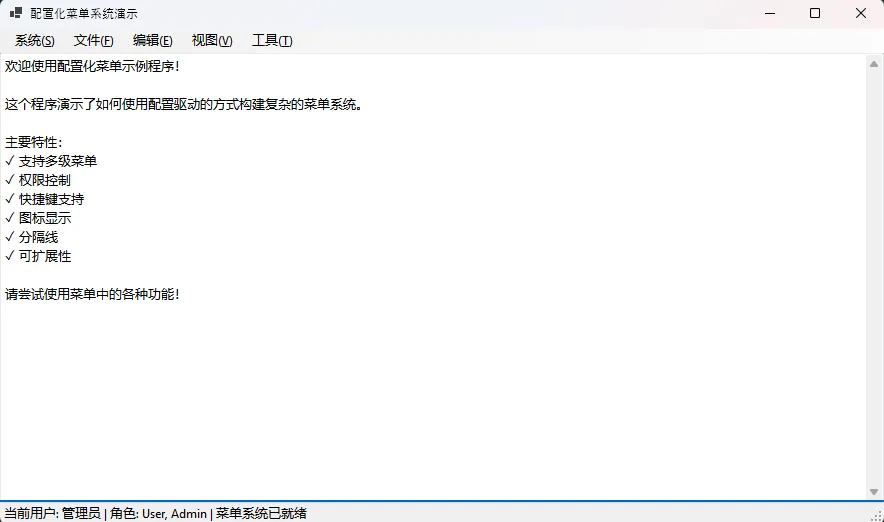
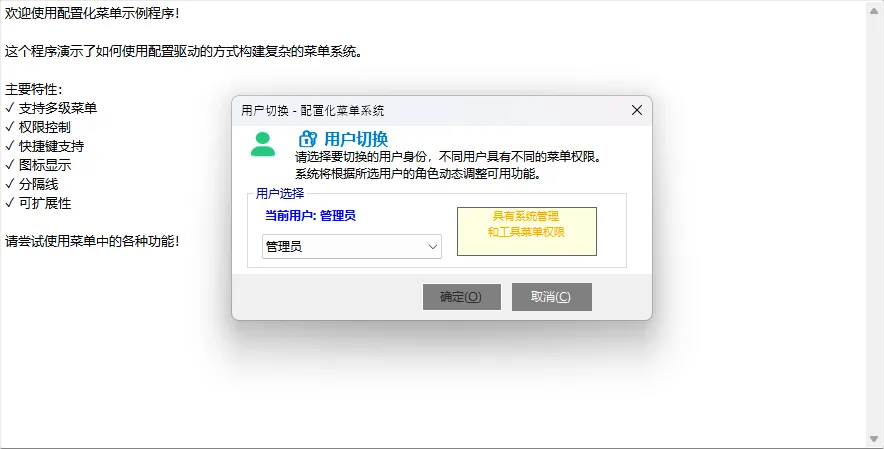
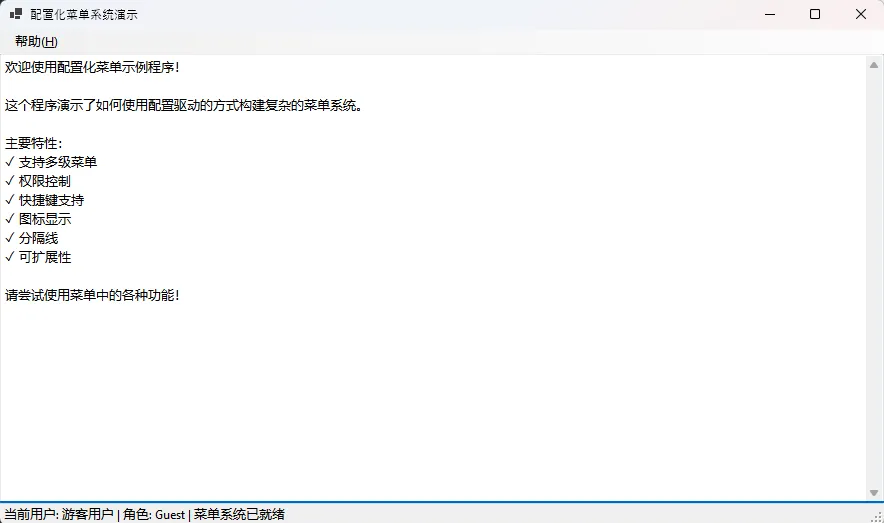
🚀 运行结果